Change the reading surface.
Bright backgrounds, neutral text, borders and form controls adapt to your chosen palette. New content is styled as it appears.
seafonic darkmode / browser extension
A Chrome extension for calmer everyday websites.
Open it from your toolbar, choose your colors, and give bright pages a softer backdrop. Switch to the original page whenever you need it.
Chrome development build · Store listing planned
What darkmode does
Install the extension, choose a palette, and open a website. The general styling engine applies your default to ordinary web pages with Chrome site access. You can turn it off or adjust a site separately.
Bright backgrounds, neutral text, borders and form controls adapt to your chosen palette. New content is styled as it appears.
Photos, videos, charts and rich text editors retain their original appearance wherever possible. Status colors stay recognizable.
Choose a preset, set a default for your websites, or give a site its own palette in Settings. Light mode restores the original page. Dark mode applies Core. Saved choices stay in this browser after a reload.
community and featured palettes
Explore the seafonic darkmode collection. The extension brings these colors to ordinary websites, with simple light and dark controls.
see the extensionChoose a palette here to explore its colors. Saving and account syncing are separate from this website showcase.
Inside the extension
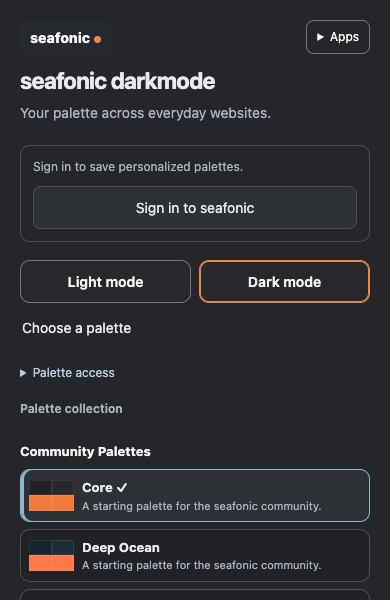
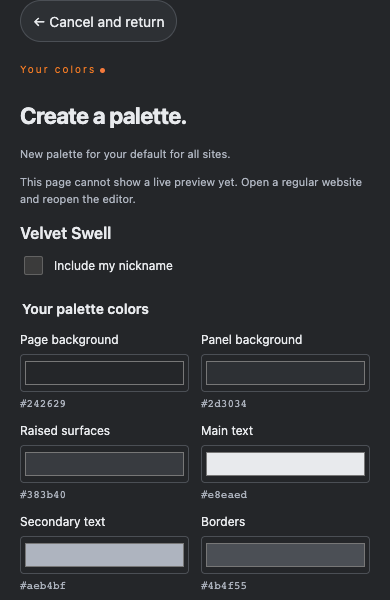
A compact palette chooser and a separate editor. These images show the development interface, signed out.
Planned paid feature
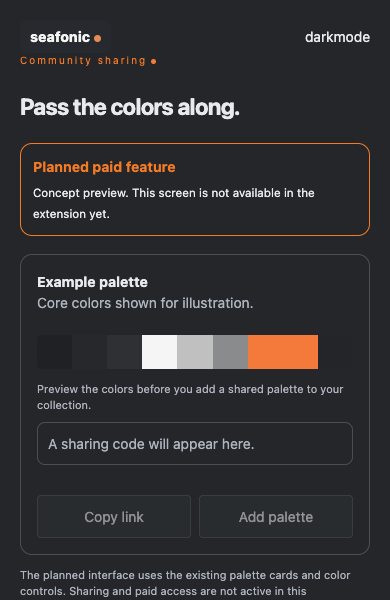
Community colors are better together. Sharing from the extension is planned as a paid darkmode feature, so you can pass a palette along and keep a shared collection.
The sharing screen is not available in the current extension. Paid access is not active in this development build.
This illustration shows how sharing could look. It is not a working screen.
Get set up
Until the Chrome Web Store listing is available, install the packaged development build in Chrome. No programming or build tools are needed.
Download development build 1.2.29 and extract it to a folder you will keep, such as a darkmode folder in Documents.
Enter chrome://extensions in the address bar and turn on Developer mode.
Click Load unpacked and select the extracted folder that directly contains manifest.json. Confirm the card shows version 1.2.29.
Allow ordinary website access if Chrome asks. Pin seafonic darkmode, open a regular website, and refresh it after saving any work. Use the popup to choose Light mode, Dark mode or a palette.
Keep the folder that Chrome already loads. Replace the files inside that same folder with the new extracted download. In chrome://extensions, click Reload on the existing seafonic darkmode card, allow expanded website access if prompted, and confirm version 1.2.29.
Keep the existing extension instead of removing it or loading a second copy. This preserves its identity and browser settings. Save your work before refreshing pages so the updated styling can load.
Chrome settings pages, the Chrome Web Store, browser PDF viewers and some embedded content cannot be styled. seafonic apps use their own appearance controls. A store listing is planned and is not available yet.
Before you install
The extension adjusts page colors locally on ordinary HTTP and HTTPS websites. Photos, charts, status colors, and rich text editors keep their original colors wherever possible. Embedded apps and some screens may need further tuning.
Turn it off when checking exact customer facing email or page designs. Real website layouts vary, so an individual page may need further tuning.
Chrome uses the broad permission label “read and change data on sites” for extensions that alter a page. seafonic uses this access to read existing colors and apply theme styling locally. It does not collect or upload page text, messages, passwords, or customer records.
about seafonic